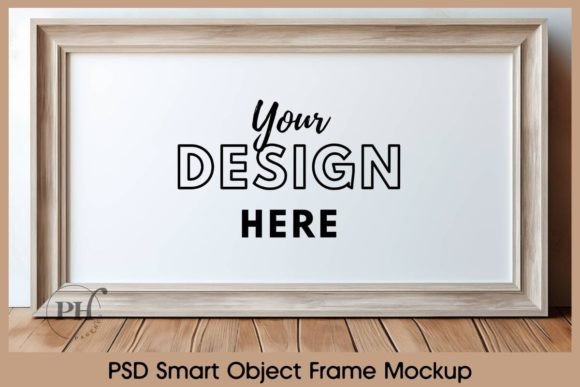
Frame TV Art Horizontal Mockup: A Designer's Go-To PSD Template
You've just finished a stunning piece of digital art. It's a horizontal composition, maybe a serene landscape or a bold abstract piece, and it looks fantastic on your screen. Now comes the tricky part: presenting it in a way that makes potential buyers or clients stop scrolling. Plopping it on a plain white background feels flat. Shooting a photo of a real frame is inconsistent and time-consuming. This is where a reliable mockup template becomes an indispensable part of your toolkit. The Frame TV Art Horizontal Mockup PSD File is designed to solve that exact problem for creators who value professional presentation without the fuss.
More Than Just a Pretty Frame
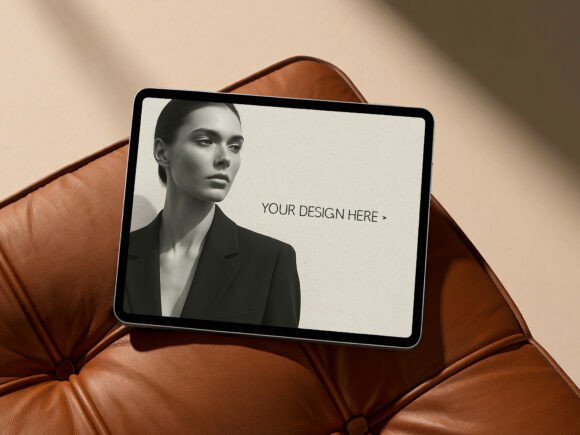
At its core, this is a high-resolution digital mockup template. The visual style is clean, contemporary, and minimalist. It presents your horizontal artwork within a sleek, modern frame that suggests a gallery or high-end home setting. The appeal isn't in flashy graphics; it's in the realistic rendering of light, shadow, and texture on the frame and surrounding environment. The personality is sophisticated and versatile—it doesn't compete with your art but elevates it. Think of it as the perfect gallery wall in a perfectly lit, stylish room, all contained within a single 4096 x 4096 pixel file. The inclusion of a JPG preview is a thoughtful touch, allowing you to quickly see the final effect before diving into the PSD.
The real power lies in the Smart Object layer. For the uninitiated, this is a game-changer. It means you don't need to manually scale, skew, or distort your artwork to fit the frame. A simple double-click on the Smart Object layer opens a new window. You paste your design, save, and close. Your artwork instantly and perfectly conforms to the perspective and lighting of the mockup scene. This preserves the professional integrity of your presentation and saves a tremendous amount of time. It’s a practical feature that respects your creative process.
Where This Mockup Template Truly Shines
Understanding where a design asset works best is key to using it effectively. This horizontal frame mockup is a versatile workhorse across numerous projects. For artists and illustrators, it’s ideal for building an online portfolio or listing prints on Etsy. It gives your work context and helps customers visualize it in their own space. Graphic designers can use it for client presentations, showcasing a brand poster or an advertising campaign in a realistic environment. It adds a layer of professionalism that a simple PDF cannot match.
For marketers and social media managers, this template is a secret weapon. It’s perfect for creating eye-catching promotional graphics for art sales, new product launches, or brand awareness campaigns on Instagram, Pinterest, and Facebook. The square 4096 x 4096 px format is optimized for social feeds, ensuring your mockup looks crisp and engaging. Bloggers and content creators can use it to feature downloadable art, DIY projects, or styled home office setups, adding visual depth to their content. Even small business owners selling home decor or art prints can use it to create consistent, high-quality product imagery for their website and marketing materials, strengthening their overall brand identity.
Influencing Perception and Professionalism
The presentation of your work directly influences how it's perceived. A sloppy mockup can undermine even the best design. Using a clean, high-quality template like the Frame TV Art Horizontal Mockup PSD File does several things. First, it establishes visual hierarchy. Your art is the undisputed focal point, framed by a neutral and appealing context. Second, it boosts brand perception. Consistent use of professional mockups signals that you are serious about your craft, building trust with your audience. It creates a sense of consistency across your portfolio or product listings, making your brand more recognizable.
This template functions much like a well-chosen premium font in a layout. Just as the right typeface can set the tone for an entire editorial design or packaging design, the right mockup sets the stage for your artwork. It’s a critical part of the modern design ecosystem, working alongside your choice of sans serif font for web copy or script font for logo accents to create a cohesive whole. It’s a creative font for your visual assets, providing the structure and style needed to make your work stand out in a crowded digital space.
Practical Guidance for Using Your New Asset
Once you download the zip file, integration into your workflow is simple. Open the PSD file in Adobe Photoshop. Locate the Smart Object layer—it will be clearly labeled. Double-click it, place your horizontal artwork, and save. That’s it. The mockup is ready to export as a JPG or PNG for your website, social media, or client presentation.
A few practical tips: Always work with a high-resolution version of your art to ensure it looks sharp in the final mockup. While the background color and frame position are fixed (as noted in the description), this constraint is actually a benefit. It forces a focus on consistency, which is crucial for building a professional portfolio or product line. Before committing to a final presentation, consider how your art's color palette interacts with the neutral tones of the mockup. Does it create the mood you want?
For those building a brand, think of this mockup as one piece in a larger puzzle of design assets. Just as you might test font pairings to find the right combination for your web design, you might use different mockups for different contexts—this horizontal one for landscapes, a vertical one for portraits. The key is to evaluate the fit. Does the sleek, modern style of this frame align with your brand's aesthetic? For most contemporary artists, designers, and entrepreneurs, the answer is a resounding yes. It’s a practical, professional tool that removes a major hurdle from the creative process, letting your work speak for itself in the best possible light.